- ARTICLE

Odoo Implementation Guide: 8 Steps from Discovery to Go-Live
ERP implementation is not just about deploying the software and activating the business application modules. It requires understanding the needs of the business, preparing existing data, configuring workflow processes, and training employees to make efficient use of the system. The structured process of Odoo implementation is useful in tying up all these things together and preventing any potential issues. Odoo offers various applications such as sales, accounting, inventory, customer relationship management (CRM), human resources, procurement, and manufacturing. Businesses can begin with the application modules they require and add others over time as per their requirements. However, in order to get these applications to work together, proper planning is essential along with accurate data and proper testing. The ERP implementation process for businesses in Saudi Arabia should consider VAT, ZATCA e-invoicing, and the use of Arabic workflows along with any other requirements. The following Odoo implementation guide highlights eight steps required for implementing the ERP project successfully.
Explore how AI in digital marketing boosts efficiency, personalised content, and improves ROI with automation, analytics, and smart strategy.

What Is Odoo Implementation?
Odoo implementation entails configuring, customizing, and installing Odoo ERP to fit the needs of a company’s business activities. The procedure involves determining the requirements of a company, choosing the right Odoo modules, installing them, migrating data, testing the system, and training employees to use Odoo.
The goal is to get Odoo working based on an organization’s processes and not just installing it.
- For any project, the odoo implementation process may entail the following activities:
- Business requirements analysis and workflow design.
- Odoo modules installation and configuration.
- Custom development and integration of third-party software.
- Data migration from spreadsheets and current business systems.
- Testing the system and conducting user acceptance test.
- Training of the employees and getting ready for ‘go live.’
- Post-implementation support and improvement of the system.
- The extent will depend on a company’s size, number of departments, current system, and degree of cuztomization required.
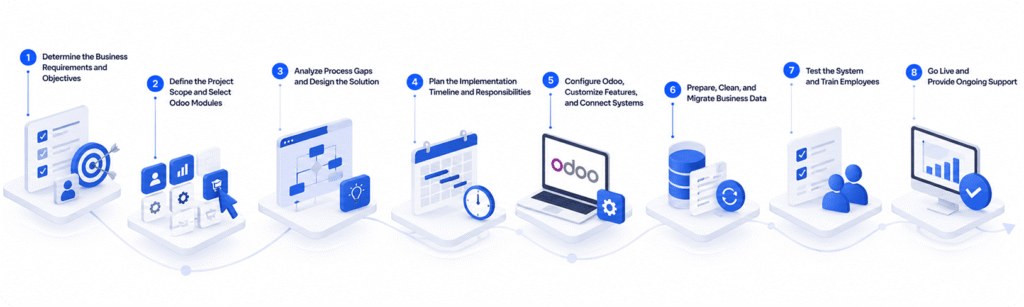
8 Steps in the Odoo Implementation Process
A successful implementation is carried out in a particular sequence, each of which prepares the organization for the next one. The eight steps below will help to organize your project implementation effectively.
Step 1: Determine the Business Requirements and Objectives
The first step involves analysis of how the business functions and determination of what it aims to achieve with the Odoo ERP system. Without proper understanding of business needs, misconfiguration and unnecessary customization will take place.
At the stage of discovery, business owners, department heads, operational employees, and project implementers will exchange information regarding problems and goals. Businesses can explore Aseef’s Odoo ERP implementation services to understand how ERP planning and configuration can align with their operational requirements.
Important activities include:
- Analyzing the existing business processes and software.
- Finding the repetitive tasks and reports that are not available.
- Understanding the requirements of different departments.
- Setting the clear goals for the ERP implementation.
- Determining the stakeholders and decision makers.
- Retail business might have the need to monitor inventory and process orders faster, whereas the manufacturing company will have other priorities – production planning, monitoring the raw materials, quality control, etc.
Expected results: A written list of the business requirements and objectives of the project.
Step 2: Define the Project Scope and Select Odoo Modules
When there are already known business requirements, it is time to see what Odoo application modules are necessary. Scope definition will make it possible to not implement extra functionality.
There are various Odoo applications available that can function together with the help of common records and workflows.
Common module selections include:
- Sales: Quotations, sales orders, and customer transactions.
- Accounting: Invoicing, financial records, and reporting.
- Inventory: Stock movements, warehouse operations, and replenishment.
- CRM: Leads, opportunities, and customer interactions.
- Purchase: Supplier records, purchase orders, and procurement.
- Manufacturing: Production orders, bills of materials, and work orders.
- Human Resources: Employee records, leave management, and attendance.
At this stage, the team should also identify required integrations, user roles, reporting needs, and any features that standard Odoo functionality cannot fully support. For requirements that go beyond standard features, businesses can explore Odoo ERP software development to understand how tailored ERP functionality can support specific operational needs.
Expected outcome: An agreed implementation scope covering modules, features, integrations, and project boundaries.
Step 3: Analyze Process Gaps and Design the Solution
Once there are some existing business requirements known, then it is high time to determine which Odoo application modules should be installed. Scope determination will ensure that additional functions are not implemented.
Various Odoo applications exist that are able to work in tandem through common data and workflow.
The design stage typically covers:
- Mapping current and future business workflows.
- Matching requirements with standard Odoo features.
- Defining approval rules and user permissions.
- Planning dashboards, reports, and notifications.
- Identifying customization and integration requirements.
- Establishing data structures and security controls.
Businesses should prioritize standard Odoo functionality wherever it meets their needs. Custom development is best reserved for requirements that cannot be addressed effectively through existing features or configuration.
Expected outcome: A solution blueprint describing the planned system structure, workflows, custom features, and integrations.
Step 4: Plan the Implementation Timeline and Responsibilities
A proper project plan facilitates easier breakdown of requirements into actions and milestones. Failure to do so may result in the following problems: delay, overlooking of dependencies, and unneccessary expansion of the scope of the project.
The project plan should contain who is responsible for what and the way it will be measured.
There are some important steps in planning a project which include:
- Milestones of configuration, migration, testing, and deployment
- Responsibility assignment among the internal project team and the implementation partner
- Approval procedure and communication
- Dependencies between departments and applications
- Testing and training of employees
- Risk Management (lack of data and critical users)
The timeline should correspond to the nature of the project. The small-scale implementation of several applications requires less time than large-scale implementation with custom modules and migration of historical data.
It will be a good idea to set up criteria of acceptance for every milestone to help stakeholders estimate their success.
Expected outcome: Project roadmap with milestones, responsibilities, dependencies and expected dates.
Step 5: Configure Odoo, Customize Features, and Connect Systems
Odoo can then be configured based on the business process selected by the organization and its stakeholders.
Configuration of company settings, accounting settings, products, warehouse settings, user settings, workflow approval process, and reports is among some of the elements of configuration required. These elements of configuration vary depending on the particular application to be used.
Where the Odoo software is not able to provide some functionality to cater to certain requirements, then the option of customizing may come into play. Customization could entail development of a module for workflow approval process, reporting, or any other internal business process of the organization.
There may also be need for integrations of the Odoo application with the organization’s website, payment gateway, e-commerce site, logistics management system, or any other application.
As for companies operating in Saudi Arabia, this phase must consider the local requirements that may be included in the Odoo system like VAT configuration and ZATCA e-invoicing workflow.
It is advisable that organizations consult their key users prior to the testing phase since they can provide the needed feedback about the configuration to determine what requirements may be missed.
Expected outcome: Configured Odoo system with agreed workflows and integrations.
Step 6: Prepare, Clean, and Migrate Business Data
Data migration is one of the key elements in Odoo implementation since the new software relies on the right and consistent data. Inconsistent, out-of-date, or duplicate records may cause issues throughout several departments.
Data migration starts with the selection of which data should be migrated from the current ERP system, spreadsheets, accounting software, and other business applications.
Typical types of data include:
- Customer and supplier records.
- Product data and price lists.
- Stock levels and warehouse data.
- Accounting balances and transaction history.
- Employee data and operations records.
- Sales orders, purchase orders, and invoices.
In preparation for the data migration, it should be checked for duplicates, missing data fields, inconsistent format, and obsolete data. The implementation team will map the source data into the Odoo data fields.
It is advisable to carry out a test migration prior to data migration. It will help ensure that the data records have been properly mapped, relationships preserved, and balance/quantity correct compared to the source system.
Expected outcome: Clean, mapped, and validated business data ready for use in Odoo.
Step 7: Test the System and Train Employees
Before making the system go live, companies should ensure that the implemented system performs according to expectations and employees know how to carry out their tasks.
Testing should involve each feature separately and as a whole. Testing just if the form loads or the record saves is not enough to ascertain that everything works properly.
Key testing activities include:
- Verifying business workflows and approval rules.
- Checking data accuracy and record relationships.
- Testing integrations and automated actions.
- Reviewing reports, calculations, and user permissions.
- Running user acceptance testing with actual business scenarios.
- Recording issues, correcting them, and repeating relevant tests.
User acceptance testing allows employees and department representatives to confirm whether Odoo supports their actual work requirements. Any critical issues should be resolved before deployment.
Training should happen alongside testing and go-live preparation. Employees should learn the applications and processes relevant to their roles instead of receiving a generic overview of every feature.
.Expected outcome: A tested system, trained users, documented issues, and approval to proceed with deployment.
Step 8: Go Live and Provide Post-Implementation Support
Go-live is the point when the business begins using Odoo for its live operations. Reaching this stage requires more than switching systems; the team must coordinate the final data transfer, confirm readiness, and ensure users know where to get help.
Before deployment, review the following checklist:
- Confirm that critical testing has been completed and approved.
- Validate final data migration and opening balances where applicable.
- Verify user accounts, permissions, and system access.
- Confirm integrations and essential business workflows.
- Communicate the cutover plan and responsibilities.
- Ensure employees have received the necessary training.
- Establish a support process for reporting and resolving issues.
The transition may take place in one planned cutover or through a phased rollout, depending on business complexity and operational risk.
After go-live, the implementation team should monitor system performance, address user questions, investigate errors, and resolve issues that affect daily work. Early support helps employees adapt to the new workflows and reduces disruption while the business stabilizes its operations.
Once the system is running reliably, businesses can review performance, improve reports, refine workflows, and introduce additional modules as requirements evolve.
Expected outcome: A live Odoo ERP system supported by a clear process for issue resolution, user assistance, and ongoing improvement.

Odoo Implementation Timeline: How Long Does It Take?
The time required for an Odoo implementation depends on the number of modules, complexity of business processes, data quality, integrations, customization, and availability of decision-makers.
A smaller implementation using standard Odoo features may be completed relatively quickly, while a complex project involving several departments or locations can take considerably longer.
The following table provides an illustrative planning framework, not a guaranteed delivery schedule.
Implementation scope | Typical planning consideration |
Basic setup with a few standard modules | Limited configuration and straightforward data migration |
Multi-department implementation | More workflow mapping, testing, training, and data preparation |
Complex implementation with custom development | Additional development, integration testing, and stakeholder approvals |
Multi-site or enterprise rollout | Phased deployment, broader governance, and extended coordination |
To develop a realistic timeline, businesses should define the initial scope, confirm data readiness, identify integration requirements, and allocate time for user acceptance testing.
A phased implementation can also help businesses introduce core applications first and add further functionality after the initial system becomes stable.
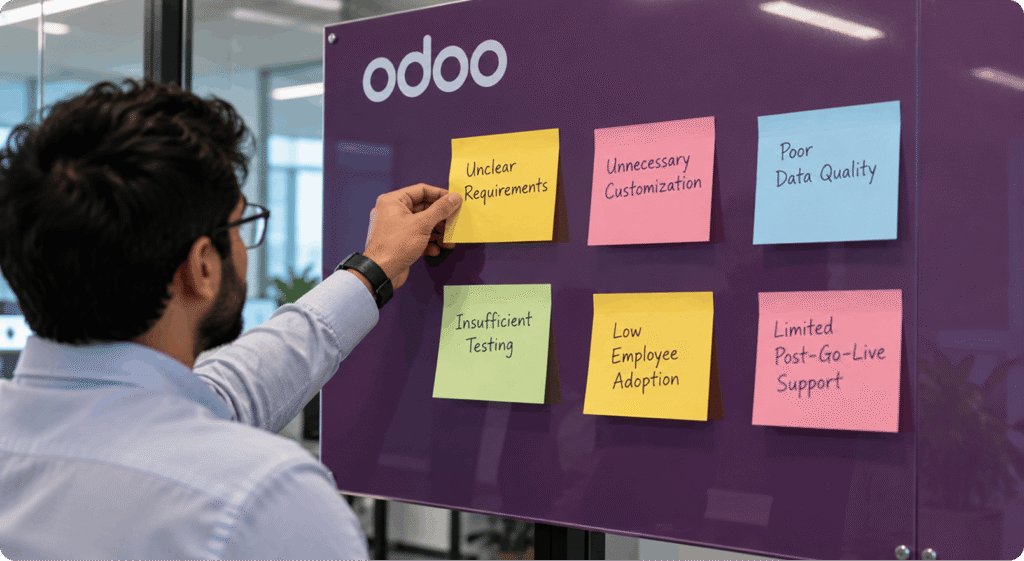
Common Odoo Implementation Challenges and How to Avoid Them
Even a well-planned ERP project can encounter difficulties. Identifying common challenges early helps businesses make better decisions throughout the implementation process.
Unclear Requirements
When business needs are not documented, teams may discover missing features after configuration has started.
How to address it: Conduct requirement workshops, document workflows, agree on project scope, and obtain stakeholder approval before development begins.
Unnecessary Customization
Customizing every process can increase development effort, maintenance requirements, and upgrade complexity.
How to address it: Evaluate standard Odoo functionality first and customize only when a genuine business requirement cannot be met through configuration.
Poor Data Quality
Incomplete or duplicated records can affect reporting, inventory accuracy, and financial information.
How to address it: Clean source data, define migration rules, perform test imports, and validate important records before the final transfer.
Insufficient Testing
Testing only individual applications may leave problems in connected workflows undetected.
How to address it: Test complete business scenarios, involve end users, verify integrations, and resolve critical issues before go-live.
Low Employee Adoption
Employees may continue using spreadsheets or old procedures if they do not understand the new system.
How to address it: Involve employees early, provide role-based training, communicate workflow changes, and offer support during the transition.
Limited Post-Go-Live Support
Without a clear support process, small issues can disrupt daily operations or discourage employees from using Odoo.
How to address it: Assign support responsibilities, track reported issues, prioritize business-critical problems, and review system performance after deployment.
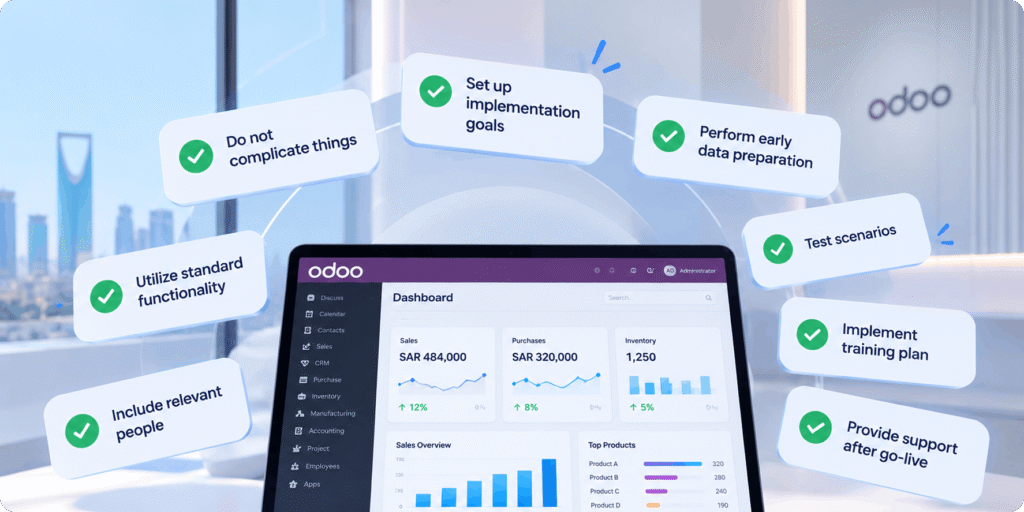
Odoo Implementation Best Practices
-
Set up implementation goals:
-
Do not complicate things:
-
Utilize standard functionality:
-
Perform early data preparation:
-
Include relevant people:
-
Test scenarios:
-
Implement training plan:
-
Provide support after go-live:
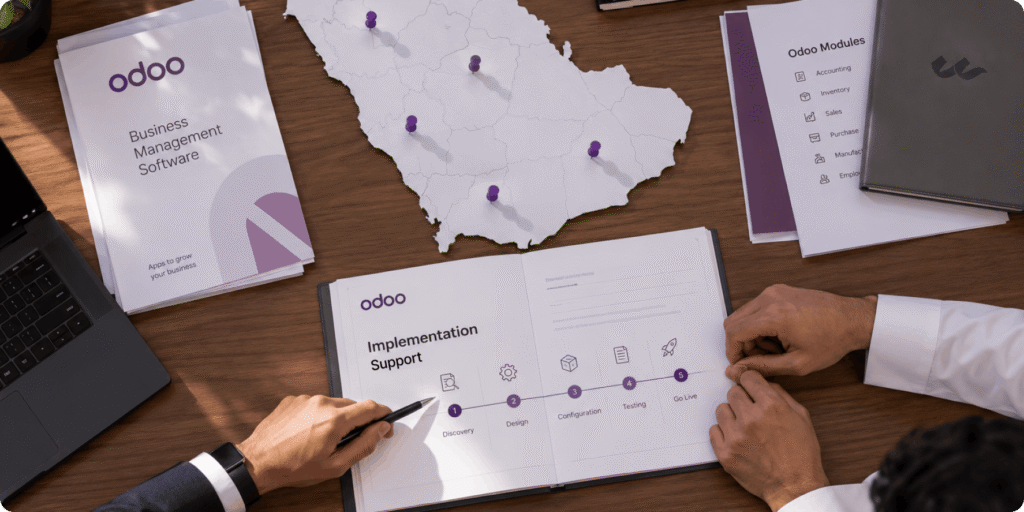
How Aseef supports Odoo Implementation for Saudi businesses
Aseef implements ERP services by configuring ERP applications of the organizations according to the way these organizations work in Saudi Arabia. The methodology involves crucial steps of ERP implementation which include business analysis, system configuration, migration, testing, deployment, and support.
According to the scope of the project, implementation may involve:
- Business Analysis: Analysis of existing processes, recognition of operational issues, and ERP requirement definition.
- System Configuration: Configuration of Odoo modules, users, workflows, and reports in accordance with the business requirements.
- Customization & Integration: Implementation of customizations and integration of Odoo with required business applications.
- Data Migration and Testing: Preparation of business documents, verification of migrated data, and testing of the system workflows.
- Deployment and Training: Preparation of the system for deployment and training of employees on using processes implemented by the ERP.
- Ongoing Support: Troubleshooting, performance monitoring, and identification of improvement opportunities.
The companies can use the Odoo ERP software and development experience of Aseef to understand the potential of implementation, customization, and further development of ERP.
ERP implementation planning should be carried out considering the requirements of the region such as VAT and ZATCA e-invoicing (where applicable) together with the existing operational and reporting requirements of businesses.
CONCLUSION
A successful Odoo implementation begins with understanding business requirements and continues through solution design, configuration, data migration, testing, training, and go-live support. Each stage helps prepare the organization for a more connected and reliable way of managing its operations.
Businesses should prioritize clear project scope, accurate data, practical testing, and employee readiness instead of focusing only on technical deployment. After go-live, regular monitoring and continuous improvement help keep the system aligned with changing business needs.
Aseef supports businesses with Odoo ERP implementation, customization, integration, and ongoing assistance tailored to their operational requirements. Explore Aseef’s Odoo ERP services to discuss an implementation approach suited to your business.
Blog Summary
- Explains the eight key steps of Odoo implementation, from identifying business requirements and selecting modules to deployment and post-implementation support.
- Covers solution design, project planning, Odoo configuration, customization, system integration, and business data migration.
- Outlines how to test ERP workflows, conduct user acceptance testing, and train employees before go-live.
- Highlights common Odoo implementation challenges, including unclear requirements, poor data quality, unnecessary customization, and low employee adoption, along with best practices to address them.
- Explores implementation timelines and Saudi-specific considerations, including VAT, ZATCA e-invoicing, and Arabic-language requirements.
- Explains how Aseef supports businesses with Odoo implementation, customization, integration, data migration, employee training, and ongoing assistance.
Frequently Asked Questions (FAQs)
How much time does Odoo implementation take?
It depends on the scope of the project, the number of modules to implement, data migration, integrations, etc. Implementation might be quicker if you are implementing a simple project rather than a complicated multi-department deployment.
Can Odoo be customized according to the needs of your business?
Yes. It can be customized to meet your workflow, reporting, and other particular needs. However, you should try to make use of its standard functionality as much as possible.
Is data migration essential for the deployment of Odoo?
Yes, because data migration is usually essential when a company is moving from an existing ERP, spreadsheet, or any other software package. Depending on which data needs to be migrated, this process will differ.
Why is user training essential during the deployment of Odoo?
This is done to ensure employees have the knowledge and understanding of the applications and processes related to their specific job functions. Training may help to avoid any possible user mistakes.
What do businesses need to test prior to the Odoo go-live?
Among the things businesses should test are critical business processes, data migration, permissions, reporting, automation, and approval rules.
Does Odoo implementation require support?
Support assists organizations in dealing with problems, providing help to staff members, tracking performance, and adjusting the software to changing needs. Support becomes most useful immediately following the go-live phase and during the addition of new modules/integration.
What should Saudi organizations take into consideration in case of Odoo implementation?
Saudi organizations should consider their workflow, Arabic language capabilities (if necessary), VAT and ZATCA e-invoicing, integration, data security, and employee training.
Publication Date
Category
- ERP Software
Table of Contents

Let’s start a project today
Start your project with us and unlock innovative solutions tailored to your needs. Our team is ready to bring your ideas to life and deliver exceptional results.




Let's start a project today
Start your project with us and unlock innovative solutions tailored to your needs. Our team is ready to bring your ideas to life and deliver exceptional results.
Request Solution